The Modern AI & Automation Toolkit Decoded: GenAI, Cursor, No-Code, Make & More
The pace of technological change, especially driven by Generative AI (GenAI), is staggering. New tools, platforms, and acronyms appear almost daily: AI code editors like Cursor, no-code/low-code (NC/LC) app builders, workflow automators like Make or n8n, and powerful GenAI APIs. For business leaders, particularly in SMEs, navigating this landscape and deciding what to adopt can feel overwhelming.
Which tools are genuinely useful? When is a simple automation platform enough, and when do you need custom development? How do you choose the right approach without wasting resources or hitting limitations down the road?
At Fanktank, we help businesses architect intelligence with clarity and precision. Part of that involves understanding the entire ecosystem. This post aims to decode the modern toolkit, categorizing key approaches and helping you think strategically about what fits *your* specific needs.
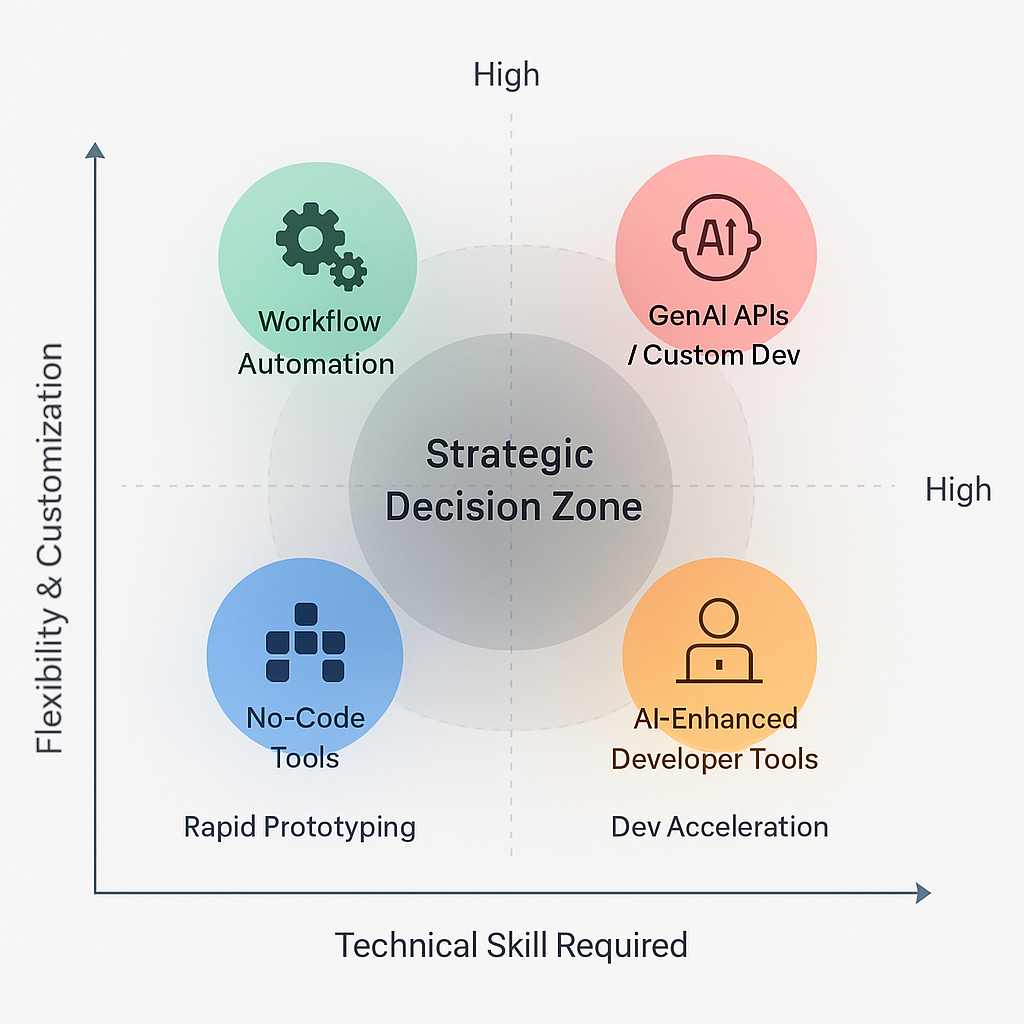
The Foundation: Generative AI (APIs & Models)
- **What it is:** Direct access to powerful foundational models (like OpenAI's GPT series, Anthropic's Claude, Google's Gemini, or open-source alternatives) via Application Programming Interfaces (APIs) ([OpenAI, 2024](https://openai.com/api/pricing/)).
- **Use Cases:** Powering custom chatbots, generating tailored content, performing complex analysis, driving backend logic for specialized applications, enabling advanced [RAG systems](/blog/unlock-your-company-knowledge-rag).
- **Pros:** Highest flexibility, access to state-of-the-art capabilities, ability to build truly unique applications.
- **Cons:** Requires programming expertise (Python, JavaScript, etc.) to integrate, involves managing API keys and costs (per token), needs careful prompt engineering.
- **Fanktank Connection:** This is often the core engine we use when building [Custom AI Solutions](/services/custom-dev) or integrating intelligence into [AI-Enhanced Websites](/services/web-solutions).
Category 1: AI-Enhanced Developer Tools (e.g., GitHub Copilot, Cursor)
- **What they are:** Tools designed specifically to augment the software development process itself. Cursor, for example, is an AI-first code editor integrating tightly with LLMs ([Cursor, 2024](https://www.cursor.com/features), [Daily.dev, 2024](https://daily.dev/blog/cursor-ai-everything-you-should-know-about-the-new-ai-code-editor-in-one-place)).
- **Use Cases:** Accelerating coding via code generation/completion, debugging assistance, code explanation, refactoring suggestions, automating tests.
- **Pros:** Can significantly boost developer productivity and code quality. Helps teams adopt new technologies faster ([Builder.io, 2024](https://www.builder.io/blog/cursor-advanced-features)).
- **Cons:** Primarily benefits the development team directly, doesn't build the end application for users itself. Requires developers to use effectively.
- **Fanktank Connection:** We leverage these tools internally to build client solutions more efficiently and maintain high code quality. They enhance *our* ability to deliver value.
Category 2: No-Code / Low-Code (NC/LC) Application Builders (e.g., Bubble, Softr, Webflow, Retool)
- **What they are:** Visual development platforms allowing users to build web or mobile applications with minimal or zero traditional programming ([Bubble, 2024](https://bubble.io/), [NoCodeAlliance, 2024](https://nocodealliance.org/tool-overview/bubble), [Airdev, 2024](https://www.airdev.co/post/what-is-bubble-beginners-guide-building-bubble-app)).
- **Use Cases:** Creating Minimum Viable Products (MVPs) quickly, building internal tools and dashboards, simple marketing websites, prototyping ideas.
- **Pros:** Speed of development for simple applications, accessibility for non-technical users ("citizen developers"), often lower initial cost for basic apps.
- **Cons:** Can hit limitations with complex logic, custom features, or unique UI requirements. Scalability can become a concern. Platform lock-in is common. Deep or novel AI integration beyond pre-built plugins can be difficult or impossible. Data ownership and export options need scrutiny ([Belighted, 2024](https://www.belighted.com/blog/bubble-no-code-review), [NoCodeTech, 2024](https://www.nocode.tech/tools/bubble)).
- **Fanktank Connection:** Excellent for rapid prototyping or very simple internal tools. However, businesses often approach us when they hit the limits of NC/LC and need the scalability, custom features, robust backend, or deep AI integration only achievable through custom development ([AI-Enhanced Websites](/services/web-solutions) or [Custom AI](/services/custom-dev)). We can help you determine if NC/LC is sufficient or if you need to transition.
Category 3: Workflow Automation Platforms (e.g., Make, n8n, Zapier)
- **What they are:** Tools that connect different SaaS applications together via their APIs, allowing you to automate processes *between* apps using a visual interface ([Make, 2024](https://www.make.com/en), [n8n, 2024](https://n8n.io/)).
- **Use Cases:** Synchronizing data (e.g., new CRM lead → add to email list), automating notifications (e.g., form submission → Slack message), simple multi-step tasks involving standard apps.
- **Pros:** Great for connecting existing cloud tools without code. Relatively quick to set up basic automations ("Zaps" or "Scenarios"). Growing number of app integrations. n8n offers self-hosting for more control ([n8n Docs, 2024](https://docs.n8n.io/hosting/), [GitHub, 2024](https://github.com/n8n-io/self-hosted-ai-starter-kit)).
- **Cons:** Limited by the available app integrations and the specific triggers/actions they expose. Complex logic, error handling, and branching can become unwieldy. Can struggle with large data volumes or real-time processing needs. AI capabilities are often limited to simple integrations (e.g., send text to OpenAI API, get response back). Can become expensive at high task volumes ([LetsFlow, 2025](https://letsflowas.com/en/blog/make-guide/), [Pixeljets, 2024](https://pixeljets.com/blog/n8n/), [Factors.ai, 2024](https://www.factors.ai/blog/zapier-vs-make-which-is-the-better-business-automation-platform)).
- **Fanktank Connection:** Useful for gluing standard cloud services together as part of a broader solution. However, when automation requires complex custom logic, interaction with bespoke systems, advanced AI decision-making, or high performance/reliability, a custom-built automation solution (often part of our [Custom AI Development](/services/custom-dev)) becomes necessary.
Choosing Wisely: Strategy Before Tools
The key takeaway is that **there is no single "best" tool**. The optimal solution depends entirely on:
- **The Specific Problem:** What are you *actually* trying to achieve?
- **Complexity:** How intricate is the logic or workflow required?
- **Integration Needs:** What existing systems must it connect with?
- **Scalability Requirements:** How much data or traffic will it handle?
- **Customization Level:** How unique are your feature or UI needs?
- **Team Capabilities:** Do you have technical resources available?
- **Budget & Timeline:** What are your constraints?
Jumping onto a tool because it's trending, without a clear strategy, often leads to frustration and wasted effort when you inevitably hit its limitations.
Fanktank: Your Partner in Navigation and Implementation
Understanding this diverse toolkit is essential, but choosing and implementing the *right* approach requires strategic insight. Fanktank provides:
- **[AI Strategy Consulting](/services/consulting):** We help you analyze your business needs and determine the most effective technological approach – whether it's leveraging existing platforms, integrating multiple tools, or building a custom solution.
- **[Custom Development Expertise](/services/custom-dev):** When off-the-shelf, NC/LC, or simple automation tools fall short, we architect and build the tailored, robust, and scalable AI and web solutions you need, often integrating foundational GenAI APIs for maximum power.
We focus on delivering reliable, precise solutions that solve core business problems, using the most appropriate technology for the task.
**Feeling overwhelmed by the tool landscape? Let's talk strategy. We can help you cut through the noise and identify the right path forward for your specific goals.**
[Book a Technology Strategy Session](/contact)
References
- [OpenAI, 2024] ["API Pricing"](https://openai.com/api/pricing/), OpenAI. *(Token pricing for foundational GenAI APIs like GPT-4o and GPT-4o-mini.)*
- [Cursor, 2024] ["Cursor Features"](https://www.cursor.com/features), Cursor. *(Highlights AI-assisted features in the Cursor code editor.)*
- [Daily.dev, 2024] ["Cursor AI Overview"](https://daily.dev/blog/cursor-ai-everything-you-should-know-about-the-new-ai-code-editor-in-one-place), Daily.dev. *(Describes how Cursor assists with coding, debugging, and refactoring.)*
- [Builder.io, 2024] ["Cursor Advanced Features"](https://www.builder.io/blog/cursor-advanced-features), Builder.io. *(In-depth look at advanced Cursor integrations for developers.)*
- [Bubble, 2024] ["Official Site"](https://bubble.io/), Bubble. *(No-code app builder enabling full-stack web development.)*
- [NoCodeAlliance, 2024] ["Tool Overview: Bubble"](https://nocodealliance.org/tool-overview/bubble), NoCodeAlliance. *(Introduces Bubble’s visual programming environment.)*
- [Airdev, 2024] ["Beginner’s Guide to Bubble"](https://www.airdev.co/post/what-is-bubble-beginners-guide-building-bubble-app), Airdev. *(Step-by-step intro to Bubble for non-developers.)*
- [Belighted, 2024] ["Bubble No-Code Review"](https://www.belighted.com/blog/bubble-no-code-review), Belighted. *(Evaluates strengths and weaknesses of Bubble.)*
- [NoCodeTech, 2024] ["Bubble Platform Review"](https://www.nocode.tech/tools/bubble), NoCode.Tech. *(Reviews Bubble as a leading no-code tool.)*
- [Make, 2024] ["Official Site"](https://www.make.com/en), Make.com. *(Workflow automation platform connecting SaaS tools.)*
- [LetsFlow, 2025] ["Make Guide"](https://letsflowas.com/en/blog/make-guide/), LetsFlow. *(Tutorial on using Make’s visual automation builder.)*
- [Factors.ai, 2024] ["Zapier vs Make Comparison"](https://www.factors.ai/blog/zapier-vs-make-which-is-the-better-business-automation-platform), Factors.ai. *(Compares automation platforms based on features and use cases.)*
- [n8n, 2024] ["Workflow Automation"](https://n8n.io/), n8n.io. *(Self-hostable automation platform with advanced capabilities.)*
- [n8n Docs, 2024] ["Self-Hosting n8n"](https://docs.n8n.io/hosting/), n8n. *(Guidance on setting up n8n for private use.)*
- [GitHub, 2024] ["n8n AI Starter Kit"](https://github.com/n8n-io/self-hosted-ai-starter-kit), GitHub. *(Open-source setup for local n8n AI workflows.)*
- [Pixeljets, 2024] ["Developer’s Take on n8n"](https://pixeljets.com/blog/n8n/), Pixeljets. *(Real-world feedback on n8n versus other automation tools.)*